ArcGIS Pro Guide
GIS
Esri ArcGIS
ArcGIS Pro Interface
ArcGIS Pro is designed to have an intuitive, easy-to-use interface and a file structure that allows you to access all the data associated with your project. The ArcGIS Pro application is web-connected to take advantage of some of the functionality available on ArcGIS Online (or Portal for ArcGIS). ArcGIS Pro has a user-based license model that allows you to use the software on any computer if you sign in using an ArcGIS Online organizational account that has been provisioned with an ArcGIS Pro license. Single and Concurrent Use licenses are also available.
Project Structure
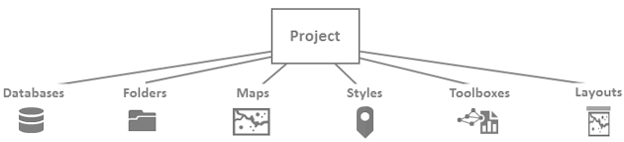
The native structure for ArcGIS Pro is called a project. A project consists of a main file with an APRX file name extension and an entire folder structure designed to contain the project data. These folders contain maps, layouts, tasks, toolboxes, styles, and connections to databases and folders.
When you start ArcGIS Pro, you are prompted to create a project or open an existing project. When you create a project, you are immediately prompted to name the project. The project is created in a folder with the name that you provided.
Map Views
An ArcGIS Pro project can contain multiple views of the geometry of the data. Views are similar to different lenses on a camera: If you take two photographs of the same subject and use a different lens for each photograph, the two images will look different even though the subject and basic composition are similar. When you use multiple views of your map, the underlying data and symbology are the same but the angle or zoom might be different. Therefore, different aspects of the map become more apparent.
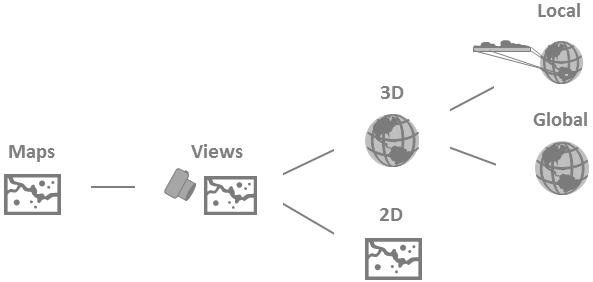
Your project can also contain several different maps. If multiple maps that use the same data are required to perform a specific task, you might want to keep all the maps in the same project. This capability is useful if you want to symbolize layers differently or turn certain layers on and off.
Editing Data
The core of a good GIS is its data. Good data is accurate and up to date; as the real world changes, the data should be revised to reflect those changes. As you work with your projects, you might need to update old information or add new geometries to your data. ArcGIS Pro allows you to add new data or update features quickly and efficiently.
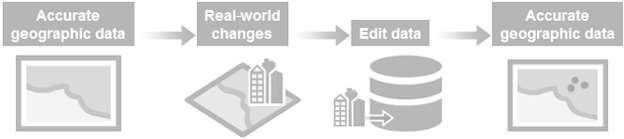
The workflow for editing in ArcGIS Pro is simple whether you are creating features or modifying existing ones.
Analysis
The purpose of creating and maintaining a GIS is to use your data to solve spatial problems. For example, you may need to determine whether one phenomenon is related to another, the shortest route between two locations, or the location of a group of features that meet any number of specific criteria. Using a GIS can help you answer your spatial questions. Depending on the question and the requirements of the project, this analysis can use geoprocessing tools or can be the result of a visual inspection of the data. The analysis can even be a combination of the two methods. In ArcGIS Pro, performing analysis is intuitive, with a simple interface for geoprocessing and visualization tools.
Map Layout
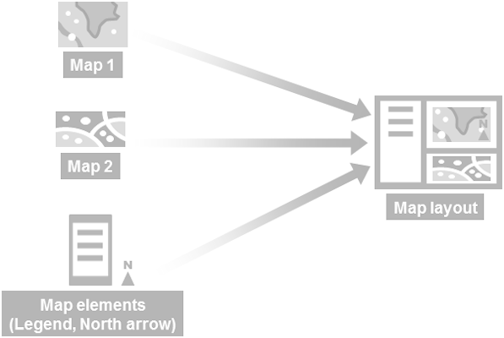
The most traditional way to share a project is as a printed map. In ArcGIS Pro, you can create a map layout for export or distribution using multiple maps, scenes, and views. You can also create more than one map layout and store it in a project.